
EAGLE GSM TOOL V2 FREE DOWNLOAD
EAGLE GSM Tool is a small program that come with multi features for MediaTek, Qualcomm, Fastboot and more. it is completly free program with a give the best features.
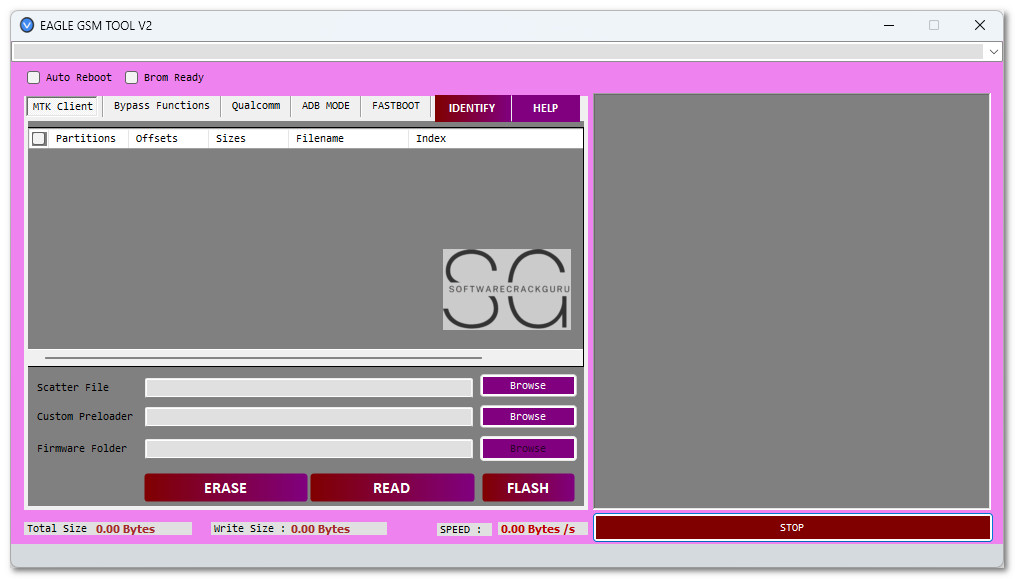


Features
🔧 MTK Client
- Scatter File
- Custom Preloader
- Firmware Folder
- ERASE
- READ
- FLASH
🔓 Bypass Functions
- Wipe Userdata
- Erase FRP
- Wipe FRP + MiCloud
- Wipe FRP + User-Data
- Backup NV
- Erase NV
Note: To use the above bypass functions, a custom preloader file is required.
📶 Qualcomm
- Firmware Flash
- Firehose File
- Firmware Folder
- FLASH
🖱️ One Click
- Firehose File
- FRP Bypass
- Mi Account Bypass
- Choose
- START
🟢 ADB Mode
- Firmware Backup / Restore
- ADB App Manager / De-Bloater
🚀 Fastboot
- Read Info
- Factory Reset
- Erase FRP (UFS)
- Reboot System
- Erase FRP (eMMC)
- Reboot EDL 1
- Reboot EDL 2
- Reboot EDL 3
- Reboot FastbootD
- Unlock Bootloader Critical
- Unlock Bootloader 3
- Unlock Bootloader 2
- Unlock Bootloader 1
- READ GPT
- ERASE
- FLASH
File Information
File Name: EAGLE GSM TOOL V2.zip
File Size: 8.29 MB
File Type: Free
Password: KALUMBA
🔧 How to Use EAGLE GSM TOOL V2 – Step by Step:
- Download the Program
- First, download the EAGLE GSM TOOL V2 zip file from the official source or your trusted link.
- Extract All Files
- Once the download is complete, right-click the ZIP file and select “Extract All”. It’s best to extract the files to your Desktop for easy access.
- Run the Tool as Administrator
- Find the file named
EAGLE GSM TOOL V2.exeinside the extracted folder. - Right-click on it and choose “Run as Administrator” to ensure full functionality.
- Wait for the Interface to Load
- The tool will now launch. Once open, you’ll see the main interface with all available features.
- Connect Your Device
- Plug in your Android device using a USB cable. The tool will automatically detect your device based on the selected mode (MTK, Qualcomm, ADB, or Fastboot).
- Start Using the Features
- Select the function you need (FRP Bypass, Flashing, etc.) and enjoy using the tool for your mobile service tasks.
Post a Comment